
We’ve reworked the acquisition setup experience to get you from instrument to recording faster than ever. The previous release required users to navigate through multiple dialog panels to configure acquisition mode and image dimensions — a process that, while functional, introduced friction during session setup, particularly for multi-run experiments.
In 2024 R2, acquisition mode and image size selection are now presented in a single, unified configuration panel. Users can switch between modes (e.g., Samux, AAV, Standard) and adjust image dimensions side by side, with live previews of the selected parameters before committing to a recording session. Contextual tooltips have been added to guide users through each option, reducing the likelihood of misconfiguration.
List:
Additionally, recently used acquisition settings are now remembered per device, so returning users can resume work with their preferred configuration pre-populated — no more re-entering the same parameters across sessions.
AcquireMP 2024 R2 introduces native support for the Antibody Stability analysis module within StreamlineMP, Refeyn’s guided workflow application for automated mass photometry data analysis.
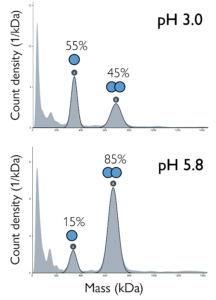
This integration means that data recorded in AcquireMP can now be seamlessly passed to StreamlineMP’s Antibody Stability workflow without the need for manual file conversion or intermediate processing steps. The module guides users through a series of automated steps tailored to antibody characterization applications, including:
To take advantage of this feature, users must have StreamlineMP version 2024 R2 or later installed alongside AcquireMP. When a compatible StreamlineMP installation is detected, the Antibody Stability module becomes available as a direct export target from the AcquireMP recording interface.
Note: Movies recorded in AcquireMP 2024 R2 can only be opened and analysed by DiscoverMP, and StreamlineMP version 2024 R2 or later. Earlier versions of the analysis software are not compatible with this release’s file format.
Left-aligned
Center-aligned
Right-aligned